

Home service companies miss roughly 27% of inbound calls. An HVAC AI receptionist answers with software, while a traditional call center relies on human agents. The difference affects how calls are handled when your crew is on a job, the office is closed, or several customers call at once.
It makes sense to weigh the trade-offs. A call center puts people in the answering process; AI can handle incoming calls without a person answering each one. The right fit depends on the calls your HVAC business receives, the help callers need, and how your team manages bookings and urgent requests.
This guide compares the two options, explains how to assess pricing and call limits, and shows how an AI receptionist can handle appointment requests and urgent calls. You’ll see which tasks it can take off your team’s plate and when a person still needs to step in.
Key Takeaways
- See how automated call handling differs from a traditional call center, and what that means for capturing new leads.
- Understand which factors shape pricing and call limits, so you can judge how a service may fit your call volume.
- Learn how call flows can sort booking requests from urgent HVAC issues and route emergencies to the on-call team.
- Explore the features that help manage routine questions and appointment requests while your crew is in the field.
How does a HVAC AI answering service differ from a traditional call center?
An AI receptionist answers calls automatically, while a traditional call center uses human agents. Both can capture customer details, but their staffing and call-handling methods differ.
For HVAC companies, the practical difference is who handles the first conversation, when they answer, and what happens next.
Around-the-Clock Call Answering
An AI receptionist for HVAC companies can answer incoming calls around the clock, including after the office closes. Callers can explain what they need instead of reaching an unanswered line. A traditional call center also uses people to answer, with availability shaped by its staffing arrangements.
Consider what happens after a call is answered. A customer reporting a broken furnace needs a clear next step, not just a greeting. Your business sets the call flow: what information to collect, which questions to answer, and when to pass a request to your team.
Lead Capture from Incoming Calls
Lead capture means recording enough information to follow up on a service request. A caller might report an air conditioner that stopped cooling and provide a name, callback number, and preferred appointment time. The answering system can collect these details during the call, giving your office a usable request to review.
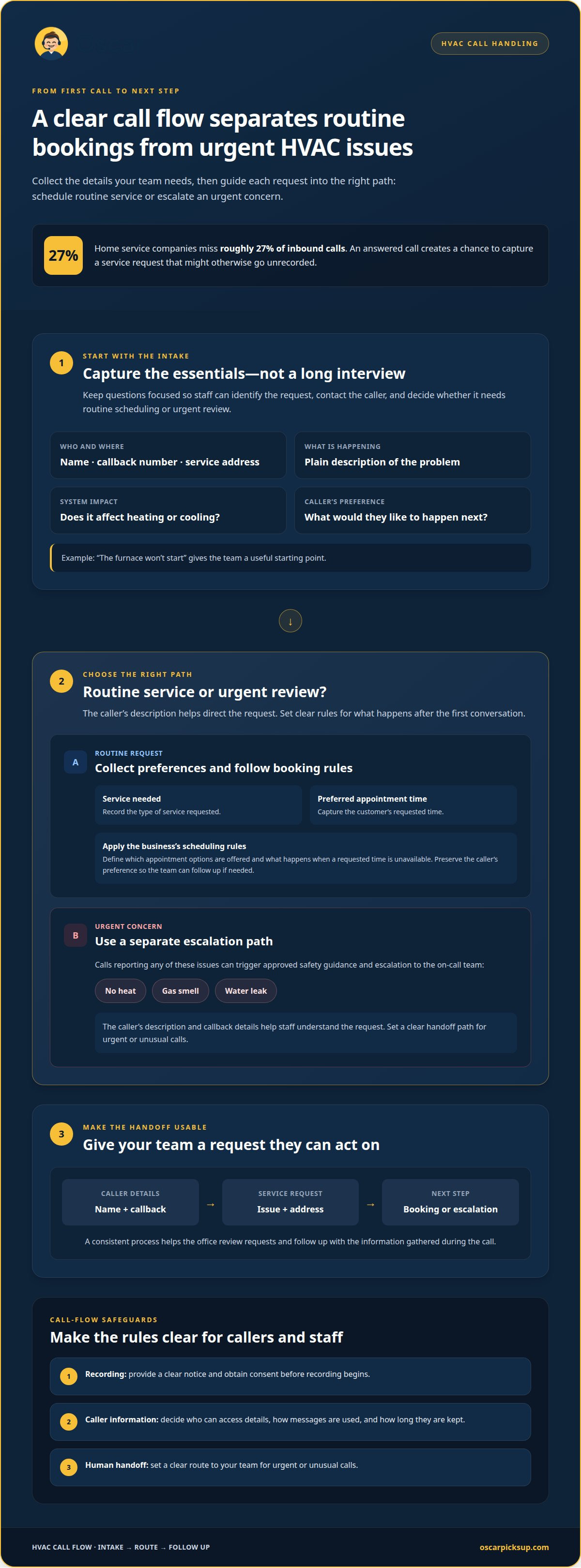
Home service companies miss roughly 27% of inbound calls. An answered call creates a chance to capture a lead that might otherwise go unrecorded. The key is a consistent process: ask for the caller’s contact details, identify the HVAC issue, and pass the message along for follow-up. A call center uses an agent for that exchange; AI uses an automated conversation.
AI Receptionist Role and Limitations
An AI receptionist answers incoming calls, responds to questions, takes messages, and can book appointments. It handles the first conversation and captures the caller’s request, but it does not perform HVAC work.
AI may misread an unclear request or miss context a caller hasn’t explained. Someone saying “the unit is making that noise again” may need follow-up questions to clarify the problem. A human agent can use judgment and ask questions flexibly; an automated system follows its configured call flow. For urgent or unusual calls, set a clear path to your team. This helps set sensible expectations for both callers and staff.
AI receptionist pricing and call-volume limits
Pricing depends on the setup and call-handling needs, with a quote provided after a quote request. In the United States, privacy and recording requirements can depend on the jurisdictions involved, so call flows should address notice, consent, and how caller information is handled.
Pricing Factors
Compare plans by the work they cover, not just the advertised monthly charge. Expected call volume matters, as do call length and the tasks handled. A flow that only takes messages is different from one that answers common questions and books appointments.
List the needs that shape your setup: calls handled, booking steps, message details, and how requests reach your team. A business that wants callers’ names and callback numbers captured needs a different call flow from one that also wants appointment requests recorded. These details help define what to include in a quote.
Call-Volume Limits
A plan may set call limits by the number of calls or the time spent handling them. Check how it counts a short message compared with a longer conversation about a heating problem. Consider seasonal peaks too, such as a cold-weather rush that brings more furnace calls than a typical week.
Map your call patterns before comparing limits. Separate new-service inquiries, existing-customer requests, and after-hours calls. Then find out what happens if demand exceeds the allowance: calls might be answered, routed, or charged differently. Include the limit and any overage terms in your quote comparison.
For call recording, build a clear notice and consent step into the call flow before recording begins. Privacy handling also means deciding who can access caller details, how messages are used, and how long they are kept. These controls make call handling clearer for customers and staff.
If you’re weighing an automated setup, review the call-answering workflow alongside your expected volume and booking needs. A clear list of call types gives the quote request a practical starting point.
Appointment booking and emergency call routing
A clear call flow turns a caller’s description into a service request, booking, or urgent handoff. For HVAC teams, it should distinguish routine work from no-heat, gas-smell, and water-leak calls.
Service-Call Intake
Start with the caller’s name, callback number, service address, and a plain description of the problem. “The furnace won’t start” gives the team a useful starting point. The intake can also ask whether the issue affects heating or cooling and capture the caller’s preferred next step.
Keep questions focused. A long intake can frustrate someone calling from a noisy home or job site. Collect only the details staff need to identify the request, contact the caller, and decide whether it needs routine scheduling or urgent review.
Appointment Booking
For a booking request, the system can collect the customer’s preferred appointment time and the type of service needed, then book according to your business’s scheduling rules. A caller requesting seasonal maintenance should follow a different path from someone reporting a system failure.
Clear booking rules define which appointment options are offered and what happens when a requested time isn’t available. The call flow should capture the customer’s preference accurately, so your team can see what they requested and follow up if needed.
Emergency Call Routing
Urgent calls need a separate path from routine bookings. Reports of no heat, a gas smell, or a water leak can trigger approved safety guidance and escalation to the on-call team. The caller’s description and callback details help staff understand the issue before responding.
Set handoff rules in advance. Specify which call types reach the on-call team, what details accompany the escalation, and how the system handles unclear reports. A caller who says “there’s water by the unit” may need clarifying questions before the request is routed.
After each call, a useful record links the intake to the next action: a booking, a follow-up message, or an urgent escalation. Keeping the caller’s contact details, issue, and requested response together helps the office and field team work from the same information. Make sure the handoff matches your actual scheduling and escalation process.
AI receptionist features for HVAC businesses
Useful features turn a phone conversation into a clear next step. For an HVAC company, focus on answering questions, capturing messages, booking appointments, and handling urgent calls.
HVAC-Specific Questions and Lead Qualification
Accuracy depends on the answers and call paths you set up. Provide clear responses to common questions, such as whether your company handles furnace repairs or air-conditioning maintenance. If a caller describes an unfamiliar problem, the system should collect details rather than guess at a diagnosis.
Lead qualification means sorting requests, not troubleshooting technical problems. Capture the issue, contact details, and requested service. This gives your team enough context to decide what happens next without making the automated conversation sound like a technician’s assessment.
Service Selection for HVAC Businesses
There isn’t one “best” setup for every HVAC company. Choose based on what callers need and which tasks the system can handle: answering routine questions, taking messages, and booking appointments. A company with frequent booking requests may value appointment handling; one receiving many basic inquiries may prioritize clear answers and reliable message capture.
Assess the actual call flow, not just a long feature list. Try examples such as a maintenance inquiry, a repair request, and a caller who needs to leave a message. The right fit should handle the tasks your office needs covered.
Setup and Training
Start by listing common caller questions, accepted appointment requests, and the details staff need for follow-up. Write plain answers about service types and booking steps. Set a clear response for questions the system cannot answer, so it takes a message instead of guessing.
Then test realistic calls: a routine maintenance request, an unclear description, and a question outside the prepared answers. Adjust the wording and call path if the result doesn’t capture the caller’s needs clearly.
Booking and Revenue Measurement
To assess whether the system supports bookings, compare call records with scheduled appointments. Track which calls led to bookings, which needed staff follow-up, and which ended without a clear next step. This shows where the process works and where callers may drop off.
To assess revenue, connect completed jobs to the calls that generated them. Separate booked work from completed work, since a booking alone doesn’t show the final business result. A simple record of call type, booking outcome, and completed service can reveal useful patterns.
Set up an AI receptionist for HVAC calls around the questions, bookings, and handoffs your team handles each day.
Oscar: Oscar AI receptionist
Oscar AI receptionist answers incoming business calls 24/7, giving HVAC callers a way to reach your business while your team is in the field or away from the phone. It can respond to questions, take messages, and book appointments without human call-answering staff.
Use an AI receptionist when calls need a consistent first response and your crew can’t stop work to answer every ring. A caller can request an appointment or leave details about a heating issue for follow-up. Oscar answers the call and captures the request; your team remains responsible for HVAC service and any next steps that require its judgment.
To discuss how Oscar can handle your HVAC calls, contact Oscar.
For HVAC businesses that need 24/7 call coverage, Oscar AI receptionist is an option: it answers questions, takes messages, and books appointments while your team is in the field.
Make the next call flow work for your crew
Choose one part of your call handling that needs attention. Routine booking requests might interrupt the office, or callers may need a clear way to leave a message while technicians are working. Start with that task: define the response callers should receive, then decide what information your team needs to act.
An AI receptionist for HVAC calls should fit the way your business already handles customer requests. Keep the initial call flow focused. A simple path is easier for staff to follow and improve as real calls reveal what callers ask. Aim for a dependable handoff, not extra work for the crew.
Oscar offers an AI receptionist for incoming business calls. Contact Oscar about HVAC call answering to discuss how it could fit your call flow.
Organize the first response on your phone line, giving your team more room to focus on the work.
Frequently Asked Questions
How does an AI receptionist handle HVAC calls, booking, and after-hours emergencies?
Oscar can answer incoming calls, gather the caller’s request, and handle booking steps set by your business. For an after-hours no-heat report, gas smell, or water leak, the call flow can identify the urgent issue and pass it to the on-call team. Clear instructions distinguish urgent reports from routine requests, such as maintenance inquiries for a later appointment.
How much does an AI receptionist for an HVAC company cost?
Pricing depends on the setup, and a quote is provided after a quote request. Cost factors include expected call volume, call length, and the tasks handled, such as answering questions, capturing messages, or booking appointments. A useful estimate starts with the calls your team wants covered and the steps each call should trigger, not a generic feature list.
Can an AI receptionist integrate with HVAC field service software and calendars?
Oscar is dedicated software that business owners can integrate, but a specific field-service platform or calendar should not be assumed. For an HVAC workflow, appointment details need to reach the schedule your staff use. Consider whether the handoff can pass the caller’s requested time and service details into that workflow, or whether a staff member will need to transfer them.
What features should HVAC companies look for in an AI receptionist?
Look for clear call handling, useful answers to routine questions, appointment booking, and a defined path for unusual requests. Test practical cases: a caller gives an incomplete address, asks about a service your company doesn’t handle, or changes a booking request mid-call. The system should capture what it can and leave staff a clear record when a person needs to take over.
How does an AI receptionist compare with a human receptionist or answering service for HVAC?
An AI receptionist uses software to answer and manage calls; a human receptionist or answering service relies on people. Human staff can respond flexibly to unusual explanations and follow-up questions. Automated call handling can manage routine calls without a person answering each one. The better fit depends on how much callers need open-ended conversation and how your team wants requests handled.
What privacy, call-recording, and consent laws apply to AI phone receptionists in the US?
In the United States, privacy and call-recording requirements can depend on the jurisdictions involved. Build a clear notice and consent step into the call flow before recording, and decide who can access caller details, how they are used, and how long they are kept.