
Setup usually involves setting call-handling rules, adding business details, and connecting the tools the receptionist needs. An AI receptionist for a small business doesn’t require you to build software, but the setup depends on your phone system and the apps you want to connect.
This is the part that can get overlooked. A plan is useful only if it fits the calls you handle and the way your business books work, takes messages, or follows up with customers.
This guide covers the setup steps, benefits to weigh, and how plans differ in call handling and app connections. It also explains what affects pricing, so you can compare options without mistaking a feature list for a good fit. You’ll learn how to judge whether an AI receptionist can handle routine calls and keep customer requests moving.
Key Takeaways
- Use FAQs and knowledge-base information to help an AI receptionist handle routine caller questions clearly.
- Set call rules around the details your business needs to collect, such as the caller’s reason for calling and requested appointment.
- Assess which connections to your CRM and business apps would help move call details into your existing work process.
- Compare receptionist software separately from your business phone system so you can see what each part of the setup covers.
How does this AI answering service benefit my business?
An AI answering service can handle routine caller questions and capture requests while you focus on work. The right fit depends on what callers need and how the service handles each call.
AI and Traditional Answering Services
Traditional answering services use people to speak with callers, while AI answering services use software to respond based on the business information provided. That makes clear FAQs and knowledge-base content important: accurate answers help the virtual receptionist handle common questions about business hours or appointment requests. According to the BBC, a virtual receptionist may only be able to answer a limited range of questions, so keep its role focused and straightforward.
Industries That Benefit Most
Which industries and types of small businesses benefit most from an AI receptionist? Businesses that receive repeated questions or appointment requests may benefit most, including service firms, salons, and appointment-based offices. A caller asking about opening hours or requesting a booking gives the system a clear, routine task. Businesses that depend on detailed, changing conversations may need more human involvement.
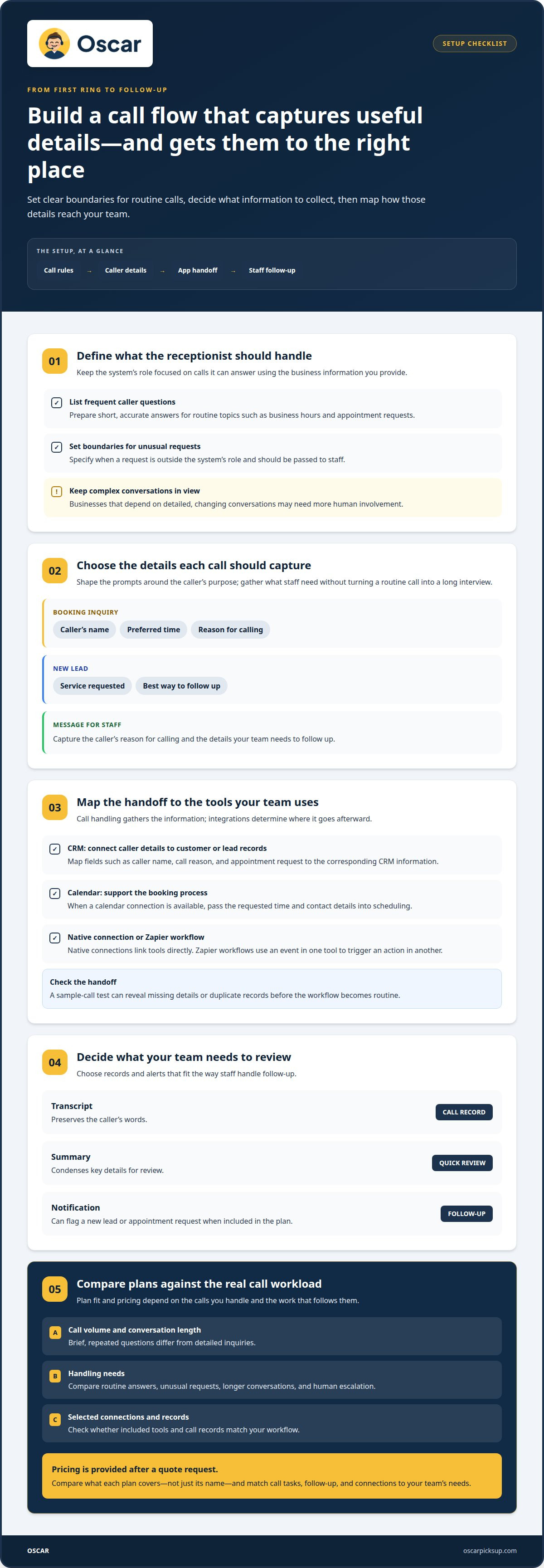
When choosing an AI receptionist for a small business, compare how each option handles the questions callers ask most. List frequent questions and prepare short, accurate answers for the knowledge base. Give clear instructions for requests that need staff attention, such as unusual queries or issues outside the system’s role. Review call summaries to check that responses and captured details meet your team’s needs.
| Option | Routine questions | Human involvement | Useful fit |
|---|---|---|---|
| AI answering service | Uses supplied FAQs | Automated responses | Repeat questions and call details |
| Traditional answering service | Handled by staff | People answer callers | Conversations needing human judgment |
Plans can differ in call handling, features, and connections to business apps. Pricing depends on the setup, call requirements, and selected features, with the price provided after a quote request. Compare what each plan covers, not just its label. Choose the option that fits your routine calls, the answers you can provide, and the handoff your team needs.
What are the product availability and pricing details of this AI phone answering service?
An AI receptionist can answer incoming calls, take messages, and book appointments. According to the UK Government, receptionists can also manage reservations and meeting room bookings. The exact tasks depend on the call rules and business information used during setup.
Shape call handling around the details each caller needs to provide. For a booking inquiry, the system might capture the caller’s name, preferred time, and reason for calling. For a new lead, it might collect the service requested and the best way to follow up. Clear prompts keep the conversation focused and gather useful details without turning a routine call into a long interview.
Call volume and conversation length affect which plan fits. A business handling brief, repeated questions has different needs from one receiving detailed inquiries. Before comparing plans, list common call types and the information needed for each. Then compare how each service handles unusual requests, longer conversations, and callers who need more than routine information.
Find out what records a plan provides. Transcripts preserve the caller’s words, while summaries condense key details for review. Notifications can flag a new lead or appointment request if they’re included in the plan. These tools support follow-up, but the best choice depends on who reviews calls and how the information reaches them.
AI handling and human escalation are separate parts of a call flow. Set rules for what the system can answer, what details it should capture, and what to do when a request falls outside those rules. For example, it can take a message for staff to follow up instead of attempting to resolve a complex issue. Appointment booking works best when the caller’s request and the booking process are clear.
The price depends on the setup and is provided after a quote request. Call volume, handling needs, and selected connections all affect it. Compare plans by matching included call tasks and records to your workflow, not by plan name alone.
Review the call-handling approach to see how routine calls and follow-up can fit together.
Integrations with CRMs, Zapier, and business apps
Integrations determine where caller details go after a call. Map each handoff, from an incoming message to a CRM record, calendar entry, or staff follow-up.
CRM and Workflow Connections
A CRM connection can place caller details alongside an existing customer record. For example, a service request might include the caller’s name, reason for calling, and preferred follow-up. This is separate from call handling: the receptionist gathers information, while the CRM helps staff use it in their next step.
Some connections are native, meaning the two tools link directly. Zapier connects apps through configured workflows, where an event in one tool triggers an action in another. The right approach depends on which apps your team uses and what information each step requires.
Keep the handoff consistent. Define the important fields, such as caller name, call reason, and appointment request, then map each one to the corresponding place in your CRM. A short test using a sample call can reveal missing details or duplicate records before the workflow becomes routine.
Calendar and Business-App Integrations
Calendar connections focus on scheduling, while CRM connections organize customer and lead records. If a caller requests an appointment, a calendar workflow can carry the requested time and contact details into the booking process, when that connection is available. Practice-management tools may serve a similar role for businesses that organize client work there.
Business apps can also send a call summary or message to the team’s usual work queue. For example, a new inquiry could create a follow-up task instead of sitting in a separate call log. The key difference is the destination: calendars support scheduling, CRMs track relationships, and workflow apps move tasks between tools.
Before choosing an AI answering solution, map the route for one missed-call scenario: caller details are captured, a record is created, and staff follow-up is assigned. Include the people responsible for the next step and decide what information they need. Keep call handling simple, with only the integrations that support a real business task. This makes each connection easier to manage and helps prevent scattered or inconsistent caller records.
Business phone system and receptionist add-on pricing
Separate the business phone system from the receptionist software when comparing plans. The phone platform carries calls; the receptionist handles conversations, messages, and booking tasks. Your total setup depends on the systems you already use, call volume, and required features. For example, a business with an existing phone platform has different needs from one choosing both systems together.
Receptionist add-on plans can differ in call handling, integrations, and appointment tasks. Review how each plan handles routine questions, longer conversations, calendar access, and lead details. A booking workflow needs clear rules for available times and the information to capture. An instant answer alone doesn’t show whether the platform supports the work that follows the call.
What are the limitations and risks of using an AI receptionist for a small business? It may misunderstand unusual requests or struggle when a caller gives unclear details. Set a clear fallback, such as taking a message for staff, and keep complex decisions outside its routine call handling.
Language and caller expectations matter too. A caller with a familiar question can follow a set path; someone who changes topics may need a person. Define which questions the system answers, what details it collects, and when it should stop and record a message. Test a typical booking and an unusual request to see whether the rules lead to useful next steps.
Compare the phone platform and receptionist add-on as separate parts of your decision. Identify what each covers, then match those features to your call volume and workflow. Calendar booking is useful only if appointments are part of your process. If your current phone system already handles call routing, focus your comparison on receptionist tasks and app connections.
To assess fit, map one caller’s path: call received, request handled, details captured, and follow-up assigned. Explore AI call handling for a practical way to compare the receptionist part of that setup.
Oscar: Oscar AI receptionist
Oscar AI receptionist answers incoming business calls 24/7, responds to callers’ questions, takes messages, and books appointments. It suits small businesses that want routine calls handled while owners focus on customers, field work, or daily operations.
Oscar is software, not a human receptionist or a business phone service. It provides automated call handling for businesses that want callers to get answers, leave messages, or request appointments. Set its role around the calls your business receives and the details callers need to share.
If routine calls interrupt your workday or messages get missed, Oscar may fit your call-handling needs. Contact Oscar to discuss using its AI receptionist in your business.
Make the next call-handling decision
A useful next step is to decide who will maintain the call rules after setup. Assign someone to keep business answers current and review requests that need personal follow-up. This ownership helps the system stay aligned with the way your business works.
For an AI receptionist for a small business, start with one practical goal: give callers a reliable first response without adding another task to your workday. Oscar offers AI receptionist software for businesses that want to answer incoming calls, take messages, and book appointments. Consider whether that role fits the calls your team handles and how you want caller requests passed along.
If you’re ready to discuss how it could fit your call-handling needs, contact Oscar about your options. A clear next step can make the decision easier, and give your team more room to focus on the work in front of them.
Frequently Asked Questions
Do I need technical expertise to set it up?
You don’t usually need technical expertise, but setup does require clear call instructions. Gather your business hours, common caller questions, appointment rules, and message details. Then decide what should happen with unusual requests. For example, callers asking about a service outside your usual work can be directed to leave a message for your team rather than receive an unsuitable answer.
How do I monitor performance?
Track caller requests and what happened next. Keep a review log noting the call reason, whether the caller received the right information, and whether a message or appointment needed correction. Ask staff to flag unclear answers and missed follow-ups. If the same issue keeps appearing, revise the business information or call instructions guiding the response.
What is an AI receptionist and how does it work for a small business?
An AI receptionist for a small business is software that speaks with callers and handles phone tasks. Oscar, for example, can answer questions and take messages or appointment requests. It gives callers a point of contact while the owner is busy with customers, jobs, or office work. Its role depends on the business information and call instructions provided.
How much does an AI receptionist cost per month for a small business in the United States?
Monthly pricing depends on the service setup, call volume, call-handling needs, and selected connections. Oscar’s price is provided after a quote request, rather than as a single monthly figure. To plan your budget, separate receptionist software from any business phone system you already use. Then consider which call tasks and app connections your workflow needs.
What are the best AI receptionist services for small businesses in 2026?
No single service suits every small business. Compare options by the calls they handle, how they capture requests, whether they support your booking process, and how caller information reaches your team. Oscar is an option for businesses seeking AI receptionist software to answer calls and manage routine requests. Match the service’s role to your callers’ needs before deciding.
How do AI receptionist services compare with a human receptionist or answering service?
An AI receptionist uses software to handle calls automatically, while a traditional answering service uses people to speak with callers. A human receptionist can respond to context in a live conversation; automated handling follows its configured information and call rules. Oscar is an AI voice assistant, not live answering staff. Choose based on the kind of interaction your callers need.
