

Your existing business number can stay in place while calls are forwarded to an AI receptionist. An AI receptionist for a tradesman can answer all incoming calls, or only unanswered and after-hours calls, so customers can keep using the number they know. You still decide which jobs to accept and when to book them.
You know the pinch point: the phone rings when your hands are full, you’re driving, or you’re on a job. This guide explains how call forwarding can keep enquiries from going to voicemail, and how an AI receptionist can collect job details, book appointments within your rules, sync your calendar, and leave room for travel. You’ll also learn what to set up before routing calls, how to handle different enquiries, and where your approval stays in control. The aim is fewer interruptions in the field, a clearer diary, and no automatic promise to take work you haven’t agreed to.
Key Takeaways
- Set clear booking permissions so an enquiry doesn’t become a confirmed job without your approval.
- Build travel time into your calendar rules to keep appointments realistic across your service area.
- Keep diagnosis, quotes, and job acceptance in your hands while calls are handled consistently.
- Choose whether to forward unanswered calls, after-hours calls, or all incoming calls based on how you work.
Booking permissions and diary control
For trades businesses, the right AI receptionist fits the way you accept and book jobs. Look for clear booking permissions, useful caller intake, and calendar handling, not automatic commitments. This keeps your diary useful without handing over job decisions.
Yes. An AI receptionist can answer calls, schedule appointments, and qualify leads by collecting details such as job type, service address, urgency, and callback number. A captured enquiry is not a confirmed job. You decide what work to accept, what to charge, and when you can attend.
Start by distinguishing an enquiry from an appointment. For example, the system can record a request about a leaking tap but leave the visit unbooked until you approve it. If you allow direct scheduling, specify which appointment types can go into the diary and which need your review first.
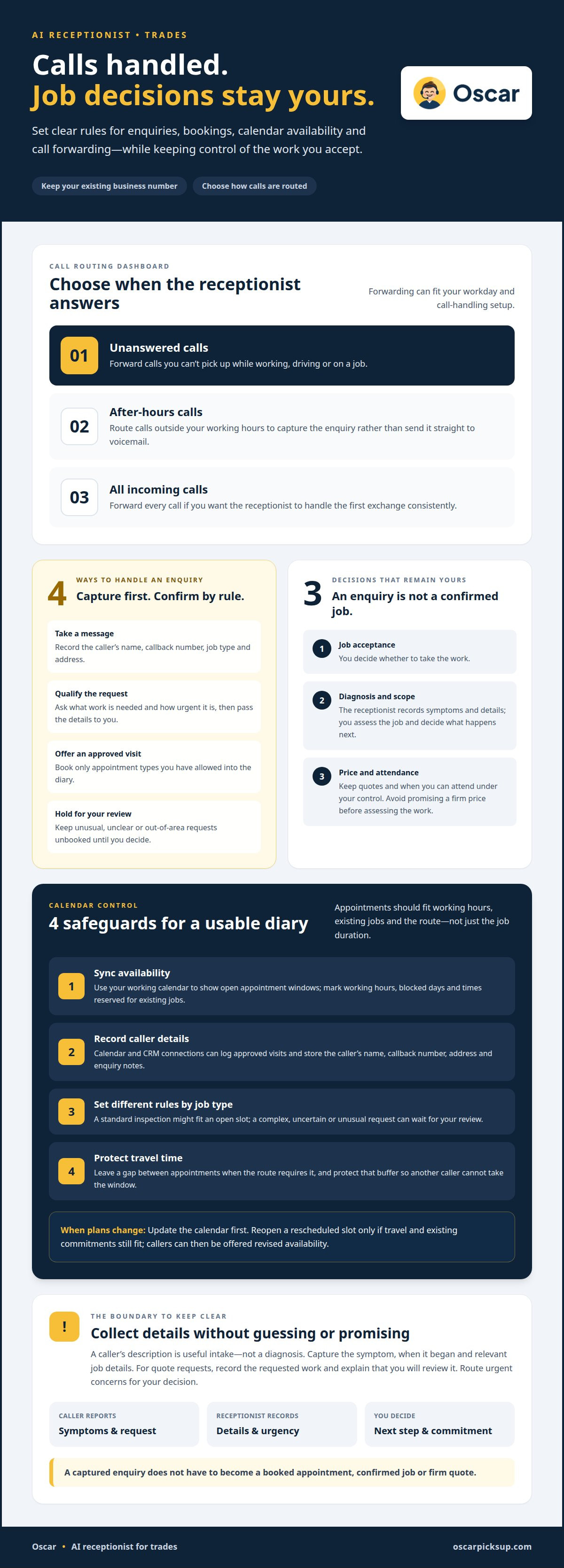
- Take a message: Capture the caller’s name, callback number, job type, and address.
- Qualify the request: Ask about urgency and the work needed, then pass the details to you.
- Offer a visit: Book only the appointment types you have approved.
- Hold for review: Record unusual, unclear, or out-of-area requests for your decision.
These rules keep your schedule from relying on guesswork. A caller asking for an urgent boiler repair may need a different response from someone requesting a routine quote. The system can collect the same core details for both, while your booking permissions determine whether either request becomes a calendar appointment.
Keep the rules practical. Define which work callers can book, what details you need before offering a slot, and which requests must reach you first. Connect the receptionist to your calendar and CRM so approved visits can be logged and caller details stay with the enquiry. An AI receptionist for a tradesman can handle these agreed steps while you retain control of job acceptance, pricing, and attendance.
Calendar synchronization and travel-time buffers
An AI receptionist can connect with a contractor’s calendar and CRM. The calendar shows available appointment windows, while the CRM stores caller details and enquiry notes. When connected, the system can log a caller and schedule an approved visit. The handoff depends on the tools and booking rules you use.
Set your calendar rules before offering appointments. Mark working hours, blocked days, and times reserved for existing jobs. Then decide which appointment types callers can book directly. For example, allow a standard inspection in an open slot, but hold a complex repair request for your review. This keeps a quick phone conversation from crowding out work already in the diary.
- Sync availability: Use the working calendar as the source for open appointment windows.
- Record caller details: Send the name, callback number, address, and job notes to the CRM.
- Separate job types: Match routine visits and uncertain requests to different booking rules.
- Block travel time: Leave a gap between appointments when the route requires it.
Travel buffers should reflect the day’s actual route, not just the work duration. A morning visit in one part of your service area may make a nearby afternoon call practical. A job farther away may need more space in the diary. Protect the buffer in your calendar so another caller can’t take that window.
Review the day’s schedule when a job moves or runs long. Update the calendar first, then let new callers book from the revised availability. For example, if a customer reschedules an inspection, reopen the slot only if travel and existing commitments still fit. This helps the receptionist offer times you can honor while you retain control of exceptions and job decisions.
Control over quotes, diagnosis, and job acceptance
The phone rings during a repair. The caller reports a breaker that keeps tripping. That description helps sort the enquiry, but it doesn’t establish the fault. An AI receptionist can record the caller’s account and pass it on. You assess the job and decide what happens next.
Keep diagnosis separate from call intake. A caller may describe a symptom, not its cause. A cold radiator, for example, could point to several issues. The receptionist can record what the customer noticed, when it started, and whether other rooms are affected. You can use those notes to decide whether a site visit makes sense.
Quotes need the same clear boundary. A firm price may depend on inspection, parts, access, and the scope of work. Set a rule for quote requests: collect the details, explain that you’ll review them, and avoid committing to a price before assessing the job.
- For diagnosis: Record the symptom and when it began.
- For a quote: Capture the requested work and relevant job details.
- For acceptance: Send the enquiry for your decision before confirming work.
- For urgent requests: Gather the caller’s concern and route it for your review.
These boundaries protect the customer conversation and your reputation. If a homeowner asks whether a roof leak needs a full replacement, the receptionist can record the concern without promising a diagnosis. You can then decide whether to arrange an inspection, request more information, or decline the work.
Write the rules in plain language. State which requests may be booked, which need your review, and what details callers should provide. Keep decisions about job acceptance, scope, and price with you. The receptionist handles the first exchange; you make the trade-specific decisions.
Forwarding calls to an AI receptionist
Forward unanswered calls, after-hours calls, or all calls. Choose the routing option that fits your workday and call-handling setup.
Call Privacy and Recording
For US businesses, call privacy and recording practices can depend on where callers and businesses are located. If you record calls, include a clear recording notice and consent step in the call flow. Set who can access recordings, how they’re stored, and when they’re deleted. Collect only the caller details the job needs, such as name, address, and callback number.
AI Receptionist Limitations
An AI receptionist can collect details, but callers may describe a fault unclearly or leave out key information. Set rules for uncertain requests, urgent issues, and questions that need trade expertise. Route these for your review rather than letting the system guess at a diagnosis, quote, or commitment. Check call notes regularly and refine questions that leave gaps in the job details.
Comparing Reception Options
An AI answering service can help handle incoming calls, while a live receptionist offers human conversation. This can help during a busy stretch when several customers call together. Human staff may suit businesses that want live conversation handling. Compare call volume, caller needs, and the decisions each option can make. Choose based on the front-desk work you need covered.
To set up call forwarding, choose which calls to route, then provide clear service descriptions, intake questions, and escalation rules. Test sample calls for a routine repair, a quote request, and an urgent concern. To assess results, track incoming calls, captured enquiries, qualified leads, booked visits, and jobs accepted. Review the records together: a booking alone doesn’t show whether the work was suitable or completed.
To put call handling in place, explore Oscar AI receptionist.
Oscar: Oscar AI receptionist
Oscar AI receptionist answers incoming business calls around the clock, so callers can reach your business while you’re on a job or away from the phone. It can answer questions, take messages, and book appointments without human call-answering staff. You remain responsible for deciding which work to accept, what to charge, and when you can attend.
Oscar can suit trades businesses that want calls handled consistently while they focus on work in the field. It gives callers a way to explain what they need and request an appointment, rather than leaving every enquiry to voicemail. You stay in control of job decisions.
Contact Oscar to discuss whether its AI receptionist fits your call-handling needs.
Put a Clear Call Plan to Work
Choose the call-handling change that would make the biggest difference to your day. Decide which calls should be answered, what information callers should provide, and which requests need your judgment. A clear plan gives the system useful boundaries and gives you a practical way to assess how well it fits your workflow.
An AI receptionist for a tradesman should support the way you run your business, not make decisions for you. Keep responsibility for work that needs your experience. Let call handling take care of the first exchange so you can stay focused on the job in front of you.
Oscar offers Oscar AI receptionist for businesses looking to handle incoming calls with an automated assistant. Contact Oscar about your calls to discuss your call-handling needs. A well-set call plan can help the next enquiry reach a clear, useful next step.
Frequently Asked Questions
Can I keep my existing business phone number?
Yes, call forwarding lets you keep using your existing business number. Choose whether unanswered calls, after-hours calls, or all incoming calls go to the AI receptionist. For example, you can answer calls yourself during a quieter part of the day and forward them when you’re on a job. Customers can continue calling the number they already know.
Can I still take calls myself?
Yes. You can answer calls yourself and forward them when you can’t pick up. For example, use forwarding while you’re working with tools, driving, or speaking with a customer. You choose which calls the AI receptionist handles, so you can step in personally without making every caller depend on you being free at that moment.
Can she check whether a caller is in my service area?
An AI receptionist can ask for the caller’s service address and record it with the enquiry. That gives you the information needed to judge whether the location fits your working area. For example, a caller can provide their town and street before requesting a visit. Set the call flow to capture the address, then decide how to handle the request.
How do I use an AI receptionist to stop missing calls?
Forward calls you can’t answer to an AI receptionist, then give it clear instructions for common requests. Oscar AI receptionist can answer incoming business calls, respond to questions, take messages, and book appointments. A caller asking for a service visit can leave their details while you’re working under a sink. You can review the message and follow up when practical.
Want to See How an AI Receptionist Could Work for Your Business?
Oscar offers an AI receptionist that answers incoming business calls and interacts with callers. Consider it if calls often arrive while you’re busy on site or away from the phone. Think through which calls you want handled and what information you need from each caller. This gives you a practical starting point for seeing how automated call answering could fit your business.
What happens with an urgent callout?
An urgent caller can explain the problem and leave contact details, but the receptionist shouldn’t promise attendance or diagnose the fault. Set a clear call flow to capture the caller’s location, issue, and callback number. For a suspected gas leak, for example, the system can record the concern for your attention. You decide what action to take and whether to accept the work.


