

An AI receptionist for electricians answers incoming business calls, handles common questions, takes messages, and books appointments, so a ringing phone doesn’t have to pull you away from your work. It can also keep your first point of contact open after hours.
That only helps if calls are handled in a way that fits your business. A service request, a scheduling call, and a possible emergency need different responses. The caller’s needs, the details to collect, and the next step should all be clear.
This guide explains what an AI receptionist does, how it can handle after-hours calls and appointment requests, and how custom prompts can shape workflows for an electrical business. You’ll see where automation fits, when a clear handoff matters, and what to consider when setting up call handling. The goal is to keep calls moving without adding admin to your workday.
Key Takeaways
- See how an automated receptionist can answer calls after hours, capture the caller’s needs, and keep the next step clear.
- Learn what information helps turn an electrician’s appointment request into a useful booking.
- Explore how custom prompts can guide different call types, from routine service requests to urgent concerns.
- Understand how to assess whether automated call handling fits your workflow and where Oscar AI receptionist can help.
After-hours call coverage
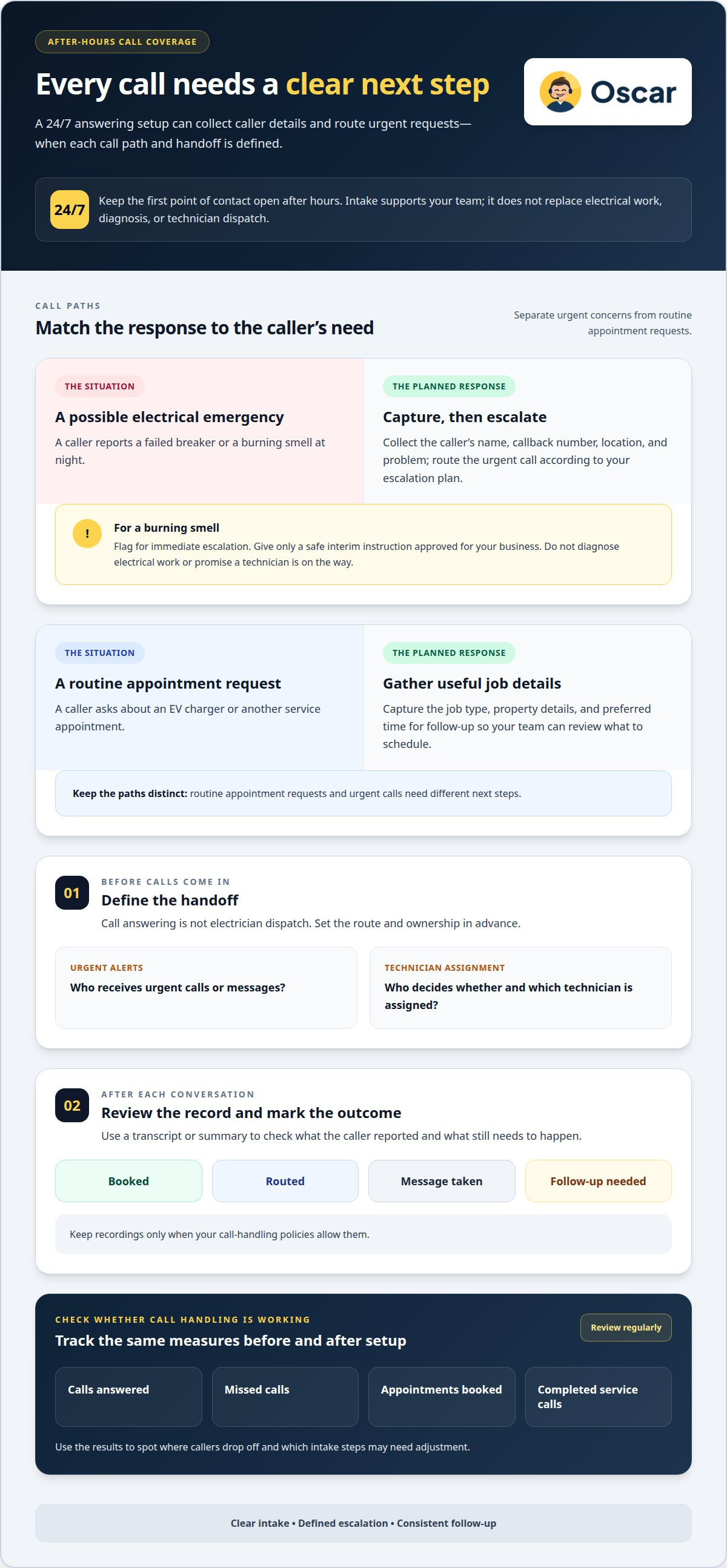
At night, a caller with a failed breaker or burning smell still needs a clear next step. A 24/7 answering setup can collect the caller’s name, callback number, location, and problem, then route an urgent call according to your escalation plan. For a burning smell, flag the call for immediate escalation and give only a safe interim instruction approved for your business. Don’t let an automated intake attempt to diagnose electrical work or promise a technician is on the way.
Appointment requests need their own path. A caller asking about an EV charger can provide the job type, property details, and preferred time for follow-up. That information helps your team decide what to schedule. Call answering is not electrician dispatch, so define who receives urgent alerts and who assigns a technician before calls come in.
What are the best AI receptionist services for electricians, and how do they compare? Compare how each service handles after-hours calls, captures job details, routes urgent requests, and books appointments. Before choosing, review the pricing model, included call minutes, and charges for usage beyond the allowance.
Can an AI receptionist answer electrical safety questions, and what should it avoid saying? It can collect details and share approved basic guidance, but it should not diagnose a fault or improvise repair instructions. For example, a caller reporting a burning smell should trigger your escalation process, not a guess about the cause.
Call records help your team follow up. Use a transcript or summary to review what the caller reported, then record the outcome: booked, routed, message taken, or follow-up needed. Keep recordings only when your call-handling policies allow them.
How can electricians measure whether an AI receptionist improves missed calls, bookings, and revenue? Track calls answered, missed calls, appointments booked, and completed service calls before and after setup. Review the same measures regularly to identify where callers drop off and which intake steps need adjusting.
What is an AI receptionist for electricians?
An AI receptionist is software that answers business calls and handles routine requests. For an electrical business, it can capture a caller’s name, callback number, service address, and reason for calling. A homeowner asking about a panel upgrade can leave these details instead of reaching voicemail. The system can also answer approved business questions and pass along messages. It supports call intake, but it doesn’t perform electrical work or diagnose technical faults.
Pricing depends on factors such as call volume, average call length, and workflow needs. Plans may count conversations, minutes, or additional usage differently. Flat-rate pricing means a recurring charge under stated terms, while metered pricing changes with measured use. If your business receives long troubleshooting calls, consider call length as well as the number of calls.
Usage limits matter during busy periods. With a plan that counts minutes, several long calls can use the allowance faster than brief booking requests. If it counts conversations, find out how repeat calls or transfers affect the total. A storm-related call or panel upgrade inquiry may need more intake than a simple scheduling request. Compare included usage, overage rules, and upgrade options with your typical call pattern.
Trial terms also shape the decision. Read the stated trial length, usage cap, payment start date, and cancellation steps before activating one. Then test a routine service call, a scheduling change, and an urgent message. Check whether the system captures the right details and routes each call as intended. For a closer look at automated call handling, explore this call-answering approach.
How does electrician appointment booking work?
Booking starts with a short intake. The receptionist captures the caller’s name, callback number, service address, job type, and preferred appointment window. An estimate request for a panel upgrade, for example, needs different details from a service call about a flickering light. This information helps your office review the request and choose the next step.
To set up call routing, define which inquiries go to office staff and which reach an on-call technician. The workflow can collect details for an urgent call and direct the message according to your instructions. Routine appointment requests follow a separate path. Staff can review the information and assign a technician based on the job and schedule.
A calendar integration can show open appointment windows and help prevent double-booking if the booking system can read and update the calendar. Set the rules first: which work types can be booked directly, how much time each visit needs, and which locations each technician covers. Without a connected calendar, the system can capture the caller’s preferred time for staff to confirm. Make clear whether a requested time is confirmed or still awaiting confirmation.
Payment processing is separate from scheduling. A booking workflow can record that a caller asked about a deposit or payment method, then pass the request to staff. Don’t treat an appointment as paid unless the payment process records a completed transaction. An estimate inquiry, for example, should remain an estimate request, not a confirmed repair or payment.
After each conversation, the appointment record should include the caller’s details, job type, requested time, and status. Staff can mark it as booked, awaiting confirmation, or needing follow-up. Clear labels make the handoff easier and help your team catch incomplete inquiries, such as a calendar request with no service address, before assigning the work.
Custom prompts and electrical-business workflows
Custom prompts adapt a general call script to an electrical business. They set the order of questions, the details to collect, and the next step for each call type. A caller reporting sparking equipment needs a different intake path from someone requesting an estimate. Clear prompts help the system collect relevant facts without guessing at a diagnosis.
Build each workflow around a real call. For a possible emergency, the prompt can ask for the caller’s location and callback number, collect a brief description, and flag the call for your chosen escalation process. For a routine service request, it can capture the issue and preferred appointment time. For a panel upgrade inquiry, it can gather project details for follow-up.
Give the system direct instructions: what it may answer, which questions to ask, and when to take a message or route the call. Set a firm boundary against recommending electrical repairs or claiming a technician has been dispatched unless your business has arranged that step. A caller describing a burning smell should receive your approved response, not improvised troubleshooting.
Test the workflow with sample calls before using it day to day. Try an after-hours call, a report of sparking equipment, and a customer comparing an estimate with a competitor. Check that each conversation captures the right information and reaches the right person. If callers repeat details, adjust the prompt. If calls rise during a storm, keep urgent intake concise and make the next action clear.
Custom prompts work best when they mirror how your team already sorts calls. Write down the call types, required details, and handoff for each one. Then update the instructions when your booking rules or service mix changes. To put call handling workflows to work for your business, get started with automated call answering.
Oscar: Oscar AI receptionist
Oscar AI receptionist answers incoming business calls 24/7, helping electricians keep calls moving while they’re on a job or away from the phone. It interacts with callers, answers questions, takes messages, and books appointments without human call-answering staff.
An AI receptionist can help if calls often come in when you can’t stop work to answer. Callers can explain what they need, leave a message, or request an appointment. Your team can then follow up on the details and handle the electrical work.
Contact Oscar to discuss whether its AI receptionist fits your call-handling needs.
Put a clear call plan in place
Start by deciding what should happen after each type of call. Set the handoff for urgent requests, choose the details your team needs, and keep the booking path simple. A clear plan gives an AI receptionist for electricians a practical role in your daily workflow without asking it to make technical judgments your team should handle.
Start with the calls that interrupt work most often. Shape the prompts around those situations, then refine them as your call-handling needs change. Oscar offers Oscar AI receptionist for businesses that want automated support with incoming calls. If you’re ready to explore whether it fits your operation, talk with Oscar about your call workflow.
Shape the process around how your team works. A clear next step can make calls easier to manage while you focus on the job in front of you.
Frequently Asked Questions
What is an electrician answering service?
An electrician answering service handles incoming calls for an electrical business. It may use live staff or automated software. Its role is to collect caller details, pass on messages, and help manage requests. For example, a homeowner asking for an estimate can leave contact information and a brief description, giving the business a clear record for follow-up.
How Does AI Handle Emergency Electrical Dispatch?
An AI receptionist can collect emergency details and send them through the routing process you set up. For example, a caller reporting sparking equipment can be flagged for the designated contact. The software doesn’t independently decide which electrician should respond or confirm a dispatch. Your team defines escalation steps and decides whether to assign a technician.
How Does AI Manage Seasonal Demand Spikes for Electricians?
During storms or other busy periods, an AI receptionist can follow preset call paths instead of treating every inquiry alike. Direct urgent reports to your chosen escalation route and capture routine requests for follow-up. Clear prompts help collect consistent details when call volume rises, giving staff a usable queue to sort by job type and urgency.
Is 24/7 after-hours support included?
Oscar’s automated call answering operates 24/7, including outside regular business hours. This means callers can interact with the software when the office is closed. It doesn’t mean an electrician is always available to take a job, or that emergency work will be dispatched. The business sets how after-hours messages and urgent requests are routed for review.
What is an AI receptionist for an electrician business?
An AI receptionist is software that answers business calls and follows instructions tailored to the company’s call-handling needs. An electrical business can use prompts to distinguish estimate inquiries from existing customers asking about a scheduled visit. The receptionist guides each caller through the relevant intake and gives staff a clearer request than an unexplained missed call.
How does an AI receptionist handle calls, bookings, and emergency electrical service requests?
The AI follows a call flow: identify the request, collect relevant details, then take the next step allowed by your instructions. It can record a booking request for scheduling or route an urgent report to the designated contact. The AI supports intake and communication; your electrical team decides on technician assignments, job scope, and repair work.


