

A plumbing call can become a lost job while you’re under a sink or driving to the next site. An AI receptionist for plumbing answers incoming calls around the clock, collects caller details, helps distinguish urgent issues from routine requests, and books appointments.
That takes pressure off the person doing the work. A missed call doesn’t have to wait until you finish a repair, find a safe place to stop, or return to the office. Callers can describe the problem and share the details your team needs to respond.
This guide explains how an AI receptionist answers plumbing calls, handles emergency triage, manages appointments, and helps reduce missed job opportunities. You’ll learn what information it can collect, when urgent calls need a clear handoff, and how call answering fits into a plumbing business’s day.
Key Takeaways
- Learn how automated call answering can keep plumbing inquiries moving while you’re on a job.
- See which caller details help sort urgent leaks from routine service requests.
- Understand how appointment booking and rescheduling can reduce back-and-forth.
- Spot where missed calls can cost a plumbing business an opportunity, and how a steady call-handling process can help.
What is a plumbing answering service?
A plumbing answering service handles calls to a business number when the office is busy or closed. An AI receptionist for plumbing businesses uses software to collect caller details, identify the request, and support the next step.
Around-the-Clock Call Coverage
Calls can route from an existing business number to an answering service, including after hours and weekends. For a burst pipe in a basement, the system can collect the address, callback number, and details about the damage for dispatch. It can record a routine water heater question for follow-up. Residential and commercial callers can be sorted by property type and service need.
Look for clear paths for urgent issues, routine service calls, and messages for staff. Weekend calls need the same useful intake as weekday calls, not just a generic greeting.
AI and Live Answering Options
An AI receptionist uses software to answer calls and collect consistent details. A live answering service relies on people to speak with callers, which can help with complex or emotional conversations. The key difference is how calls are handled, not whether the plumber still needs a sound dispatch process.
Privacy and call-recording requirements in the United States depend on the circumstances and locations involved. Set clear disclosure, consent, and data-handling procedures before recording calls. Misunderstood descriptions or incorrect categorization of an urgent issue are possible, so provide a path to staff when a caller’s needs are unclear.
Lead Qualification and Service Estimates
Lead qualification means collecting details that help staff decide what happens next. Useful fields include the issue, property type, service address, urgency, and preferred timing. A caller reporting water through a ceiling, for example, needs different follow-up from someone requesting routine drain cleaning.
An AI receptionist for plumbing calls can share only service estimates approved for callers; it can’t diagnose a plumbing problem from a phone description. To assess performance, track answered calls, complete lead details, booked appointments, and calls requiring staff follow-up. Compare those results with missed-call records and completed jobs to see whether the process is capturing useful opportunities.
24/7 Plumbing call answering and emergency triage
An AI receptionist can answer plumbing calls, collect information about the issue and caller, and help sort urgent requests. It can also book appointments when connected scheduling tools provide availability.
Emergency Call Detection and Triage
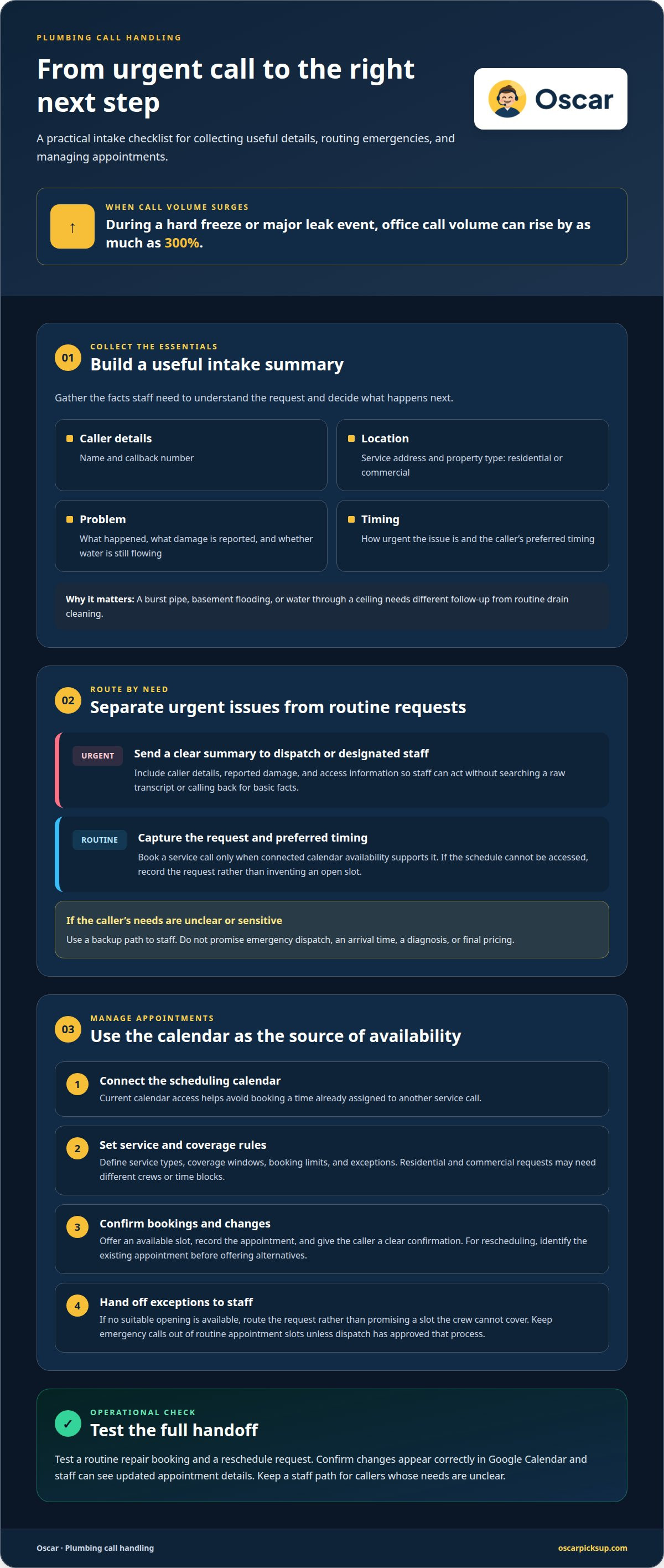
Start by collecting what happened, where it happened, and whether water is still flowing. A caller reporting a burst pipe, basement flooding, or water through a ceiling needs a different response from someone requesting routine drain cleaning. Ask for the caller’s name, callback number, service address, issue, urgency, and property type.
During a hard freeze or major leak event, office call volume can rise by as much as 300%. Clear prompts help separate emergencies from routine requests without treating every plumbing problem as a dispatch.
Emergency Intake and Escalation
After intake, send a useful summary to the dispatcher or designated staff member. Include the caller’s details, reported damage, and any access information. A summary helps staff act without sorting through a raw transcript or calling back for basic facts.
Set a backup path for unclear or sensitive calls. The system should route those calls to staff instead of promising emergency dispatch, an arrival time, a diagnosis, or final pricing. This keeps the response grounded in what the business has approved.
For non-emergency requests, an answering service can capture preferred timing and book a service call when calendar availability is connected. A Google Calendar entry can help staff see what’s booked; callers should receive a clear confirmation. If the schedule cannot be accessed, capture the request rather than inventing an open slot. A live staff handoff can also prevent urgent details from sitting in voicemail. Explore automated plumbing call answering as one way to keep intake moving while crews are working.
Scheduling, rescheduling, and appointment reminders
An AI receptionist can book plumbing appointments when it has access to current calendar availability. Set it up by connecting the scheduling calendar, defining booking rules, and directing exceptions to staff.
Appointment Booking and Calendar Sync
Calendar access helps prevent callers from booking a time already assigned to another service call. The system can offer an available slot and add the appointment to Google Calendar. Staff can then see the caller’s details, requested work, and scheduled time in one place.
Set booking rules to match the plumbing business’s actual coverage. For example, separate residential repair appointments from commercial requests if they need different crews or time blocks. Keep emergency calls out of routine appointment slots unless dispatch has approved that process.
Rescheduling and Appointment Reminders
When a caller needs to reschedule, first identify the existing appointment. The system can then offer available alternatives from the calendar and record the new time. If no suitable opening is available, route the request to staff instead of promising a slot the crew can’t cover.
Reminders help customers keep track of a booked visit. Use the contact details and appointment time already collected, and give callers a clear way to report a change. For a water heater replacement, for example, confirming the service address and visit date helps staff prepare the job information.
Start with the calendar, then set the rules. Define service types, coverage windows, booking limits, and cases that need staff review. Test a routine repair booking and a reschedule request. Confirm that each change appears correctly in Google Calendar and that staff can see the updated appointment details.
Missed plumbing calls and lost jobs
A missed call can end a job opportunity before a plumber hears the problem. The research figures say 85% of callers won’t leave voicemail, while about 78% hire the first contractor who responds. For plumbing companies, a call that goes unanswered may mean losing both an urgent repair and a routine request.
The cost isn’t limited to the immediate service call. A caller seeking estimates may contact another contractor before your crew finishes a job. Someone with a leak may need a prompt next step, while a customer planning a fixture replacement may simply want to book a visit. Every unanswered call leaves the business without enough detail to follow up.
A consistent intake process can capture the basics and keep requests visible:
- Record the caller’s name, callback number, and service address.
- Note whether the issue is urgent, routine, or estimate-related.
- Send the call summary to the person handling dispatch or follow-up.
- Confirm any appointment or agreed next step with the caller.
Those details help staff choose the next action instead of starting from scratch. A burst-pipe report, for example, needs prompt review; a water heater estimate request can enter the normal follow-up queue. Reminders can also prompt staff to return messages that need a human response.
Track answered calls, captured contact details, booked jobs, and completed follow-ups. Compare the records over time. If urgent requests are being missed, adjust the escalation path. If estimate requests stall, tighten the callback process. The useful measure is whether calls lead to clear next steps, not simply whether the phone rang.
To keep new plumbing inquiries moving while crews are busy, set up automated call answering.
Oscar: Oscar AI receptionist
Oscar is an AI receptionist that answers incoming business calls around the clock, so plumbing inquiries can be handled while you’re on a job or away from the phone. It interacts with callers, answers questions, takes messages, and books appointments without human call-answering staff.
It’s a practical next step when calls regularly come in during repairs, travel between jobs, or outside office hours. Oscar keeps the first contact moving while you focus on fieldwork. It handles calls; your team remains responsible for deciding which jobs to take and how to respond to urgent requests.
If missed calls are disrupting your plumbing business, contact Oscar to discuss its AI receptionist.
Make call handling part of the plan
The next step is to decide what callers should experience when your hands are full. Set a clear path for routine requests, urgent issues, and situations that need a person’s attention. Keep that path aligned with your crew’s actual capacity. A well-chosen AI receptionist for plumbing should support how your business handles calls, not create another process to manage.
Think through a typical workday. A customer calls during a repair. Another needs to change an appointment. A third has an issue that requires staff review. Clear instructions for each situation help keep calls moving while your team stays focused on the work.
Oscar offers Oscar AI receptionist for businesses that want software to answer calls and manage caller requests. Contact Oscar about your call setup and take the next step toward a more workable day.
Frequently Asked Questions
What is a virtual receptionist for plumbers?
A virtual receptionist is software that answers calls and handles basic requests for a plumbing business. Unlike a person at the front desk, an AI version follows configured prompts and instructions. For example, it can answer questions about business hours, collect a callback number, or note that a caller needs help with a leaking fixture.
Can AI triage water damage and burst pipe calls?
Yes. An AI receptionist can ask callers to describe the leak, where water is appearing, and whether the problem is ongoing. It can collect those answers and flag the call for staff review under the business’s escalation rules. This helps the team understand the report, but the system shouldn’t diagnose the cause from a caller’s description.
Can it book jobs into my calendar?
It can book appointments when connected to a calendar with current availability. The business’s scheduling rules should define which job types can be booked and what details each appointment requires. For a fixture repair, those might include the caller’s contact information, service address, and a short description of the requested work.
Can it identify urgency without overpromising?
Yes, if its instructions distinguish urgent reports from routine requests and set clear handoff rules. It can collect the caller’s description and flag signs such as active flooding for staff attention. It shouldn’t promise a diagnosis, dispatch, arrival time, or final price unless the business has approved that response. Clear limits help keep callers’ expectations grounded.
Can it route service-area mismatches?
It can collect the service address and compare it with the business’s defined coverage rules, if those rules are built into the call process. An address outside the coverage area can be flagged or handled with an approved response instead of being booked as an ordinary job. This helps prevent crews from receiving requests they cannot serve.
Can the AI handle real plumbing emergency calls?
It can answer an emergency call, collect information, and pass an urgent report to staff according to the business’s instructions. It cannot stop a leak, inspect a property, or perform plumbing work. For a caller reporting water spreading through a home, the system should collect useful details without promising that a technician is on the way.


